Tag: TrimVar
The action TrimVar function assigns a value to a variable (like SetVar) after having trimmed the value of the leading and trailing non-prinatble characters (line feeds, back space etc.) and blank spaces.
TrimVar can process several variables at once
Tag Attributes
|
Attributes |
Value Description |
|---|---|
|
Variable Name |
Any unreserved name valid in XML. Reserved names are listed on: Variables |
|
Variable Value |
Any string or number to escape |
Example Scripts
XML
	<SetVarFromTextFile name='xOD_RAW_FreeSpace' filepath='D:\Temp\free_space.info'/>
	<EscapeVar xOD_RAW_FreeSpace='{%xOD_RAW_FreeSpace%}' type='JS'/>
	<Echo  Value='ESCAPED: *{%xOD_RAW_FreeSpace%}*'/>

	<SetVarFromTextFile name='xOD_RAW_FreeSpace' filepath='D:\Temp\free_space.info'/>
	<TrimVar xOD_RAW_FreeSpace='{%xOD_RAW_FreeSpace%}'/>
	<Echo  Value='TRIMMED: *{%xOD_RAW_FreeSpace%}*'/>
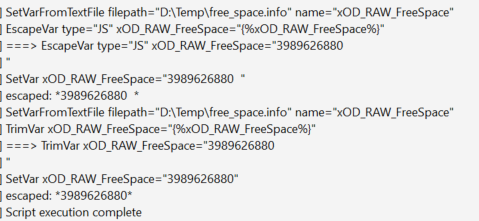
In this example, we compare the result of EscapeVar (does not remove blanks) and TrimVar (removes blanks) regarding the removal of unwanted characters: