
The Grid Data Composition panel in agentEZ lets you choose which columns (and by extension which agent data) will load in the agent grid.
To use this panel, simply select the columns you'd like to see in the grid and click the Apply button.
You can restore the default column selection by clicking the Restore Default button, then Apply.
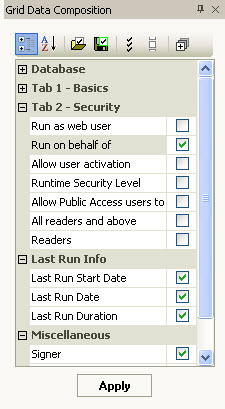
Buttons available in the Grid Data Composition panel
|
|
|
|
|
|

|
|
|
|
|
|
|
|
|
|
|
|
|
|
|
|
|
|
|
|
|
|
|
|
|
|
|
|
|
|
|
|
|
|


|
NOTE |
The Grid Data Composition panel works in a different manner than the standard column filters available in all grid windows.
Main Grid , disabling all but the essential columns improves the performance of agentEZ. This lightens the load on the grid itself, although all information is still loaded in the tool. |
|---|