
Tag: ShowEffectiveAccess
The action ShowEffectiveAccess will emulate selecting the option 'Effective Access…' found in the Tools menu of aclEZ and the option 'Show Effective Access…' in the context menu of the main grid.
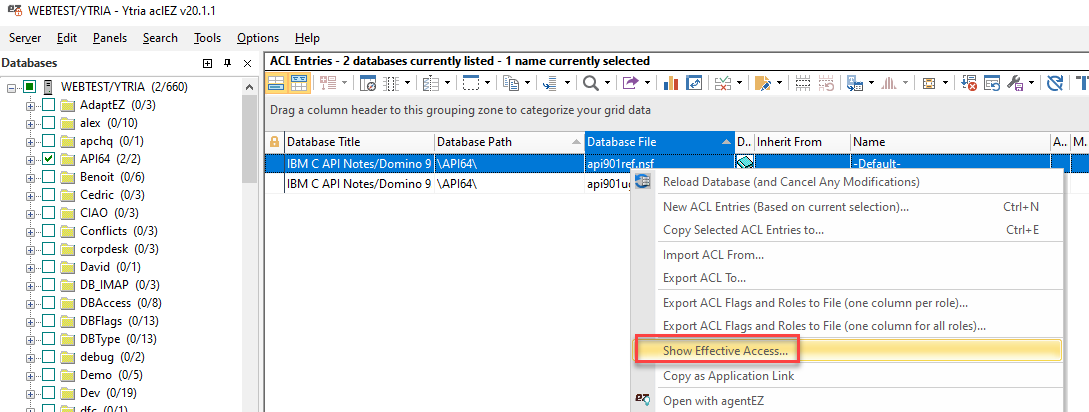
Detailed Description
A grid selection is mandatory before running an Effective Access calculation. If the current grid selection is sufficient for the effective access calculation you want to perform, no additional names need to be added via SetParam actions. In these cases, only the following is needed: <ShowEffectiveAccess/>
A grid selection is required before running an Effective Access calculation.
Tag Attributes
|
Attribute Name |
Attribute Value |
Value Description |
|---|---|---|
|
RemoveAll |
True / False |
Determines if the new instance initiated by the script block will remove the preloaded names from the grid selection - Not Required. If not used, operation will default to "False" |
SetParam Options
|
Field Name |
Compatible Field Values |
Value Description |
|---|---|---|
|
Added |
User definable |
Canonical name of user to check effective access for - Not Required (See detailed description) |
Example Scripts
<ShowEffectiveAccess RemoveAll="True">
	<SetParam Field="Added" Value="John Admin/ACME"/>
</ShowEffectiveAccess>
<ytriaAutomation>
	<Load Server="ACME01/ACME"/>
	<Select target="tree" database="mail/aglen.nsf"/>
	<Select Lines="ByValue">
		<SetParam ColumnID="ACL1" Value="Aaron Glen/ACME"/>
	</Select>
	<ShowEffectiveAccess>
		<SetParam Field="Added" Value="John Admin/ACME"/>
		<SetParam Field="Added" Value="Dorothee Parker/ACME"/>
	</ShowEffectiveAccess>
</ytriaAutomation>
In the script above, the server "ACME01/ACME" will be loaded in aclEZ, and the database "aglen.nsf" will be selected in the selection tree. A grid selection in the main grid is made using the value "Aaron Glen/ACME" found in the column with the ID "ACL1" (this is the 'Name' column). The ShowEffectiveAccess action block will then trigger the Effective Access calculation for the selected name while also adding in the names "John Admin/ACME" and "Dorothee Parker/ACME". The results of the calculation will be shown in the 'Effective Access' panel.