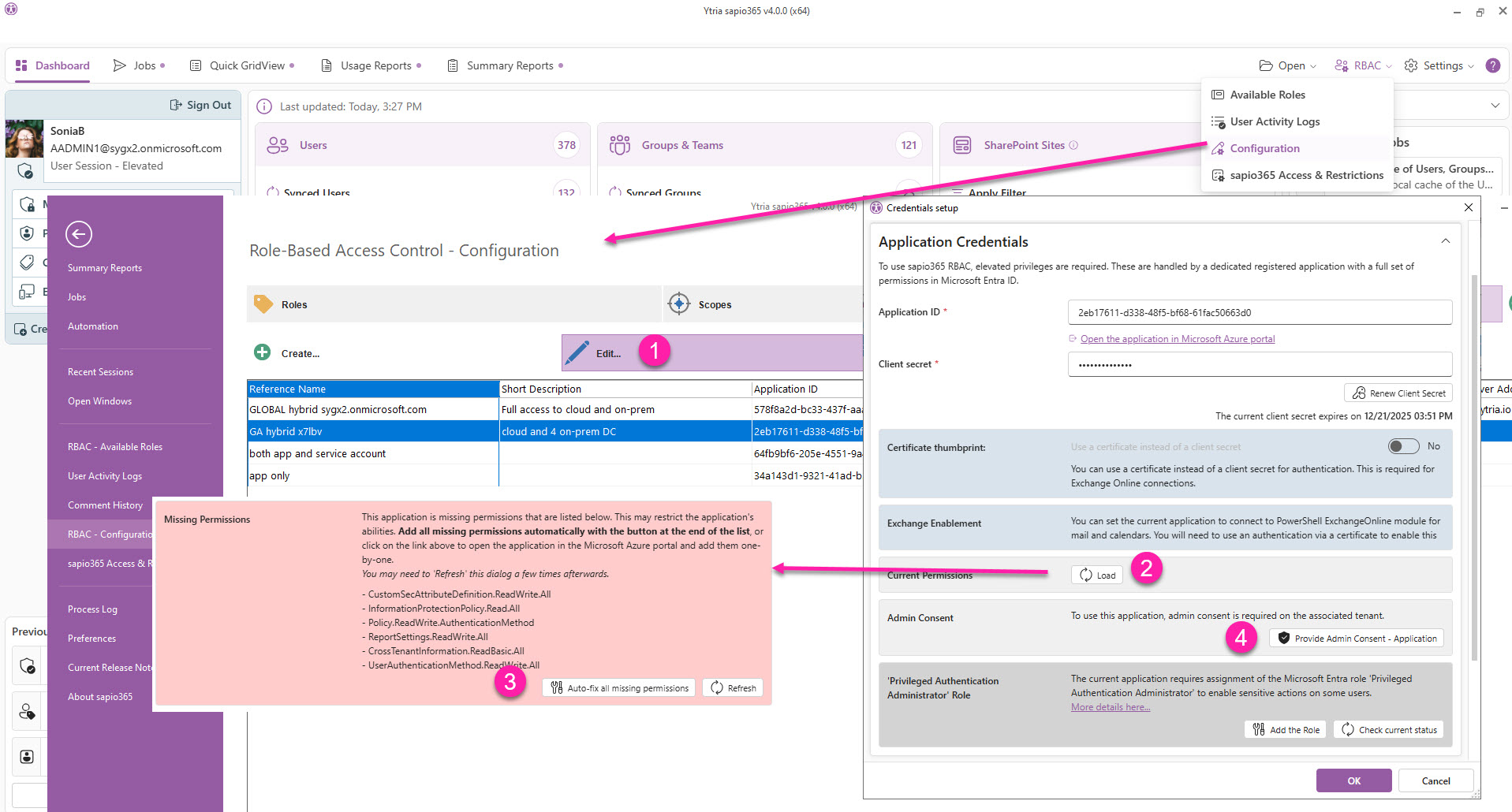
If you’ve configured sapio365 RBAC roles using credentials from other tenants, you’ll need to re-consent to the updated sapio365 application in each tenant whenever a new version is released. You may also want to update the registered application by adding and consenting to any new permissions.
This can be done by simply editing each credential set.
You must be using an updated sapio365 application before updating sapio365 RBAC credentials in other tenants.
Update a credential set with full consent
-
From the Dashboard, go to the RBAC Configuration section → Credentials section, select a credential and click ‘Edit’.
-
Click ‘Load’ to get current permissions.
Clicking ‘Load’ will retrieve the sapio365 application. If the new version isn’t found in that tenant, you’ll be prompted to sign in to the tenant and grant consent to the updated sapio365 enterprise app.
-
Click ‘Auto-fix all missing permissions’.
Adding and consenting to the missing permissions for the registered sapio365 application used in RBAC isn’t required to continue using the updated version of sapio365 with your existing role sessions.
However, any new features that depend on these permissions won’t be available for a role until you:
-
Update the registered application in ‘Credentials’.
-
Update the corresponding sapio365 RBAC role, if applicable.
-
Give consent to the permissions you’ve just added.