Tag: CreateModule
The CreateModule function allows to import the content of an automation List or of an Excel file into a blank module.
Tag Attributes
|
Attributes |
Attribute Value |
Comment |
|---|---|---|
|
True/False |
Defaults to True |
|
|
Id |
Module name (as reference for jobs/views) |
Required |
|
Title |
Module title (displayed in frame header) |
If not supplied, Id is used |
|
List |
Name of list to import in module |
|
|
FilePath |
Excel/CSV file path to import in module |
|
|
Separator |
Multivalue separator |
If supplied, data containing the separator is processed as multivalue |
One of List and Filepath is required.
Example
<ytriaAutomation>
<list name="UserCList" Action="setVar" v_ID="AdeleV@M365x421837.OnMicrosoft.com" v_Project="P1,P2"/>
<list name="UserCList" Action="setVar" v_ID="Crystal@M365x421837.OnMicrosoft.com" v_Project="P2"/>
<list name="UserCList" Action="setVar" v_ID="GerhartM@M365x421837.OnMicrosoft.com" v_Project="P1"/>
<list name="UserCList" Action="setVar" v_ID="NestorW@M365x421837.OnMicrosoft.com"  v_Project="P4,P1,P5"/>
<list name="UserCList" Action="setVar" v_ID="JoniS@M365x421837.OnMicrosoft.com"  v_Project="P2"/>
<list name="UserCList" Action="setVar" v_ID="LynneR@M365x421837.OnMicrosoft.com"  v_Project="P999"/>

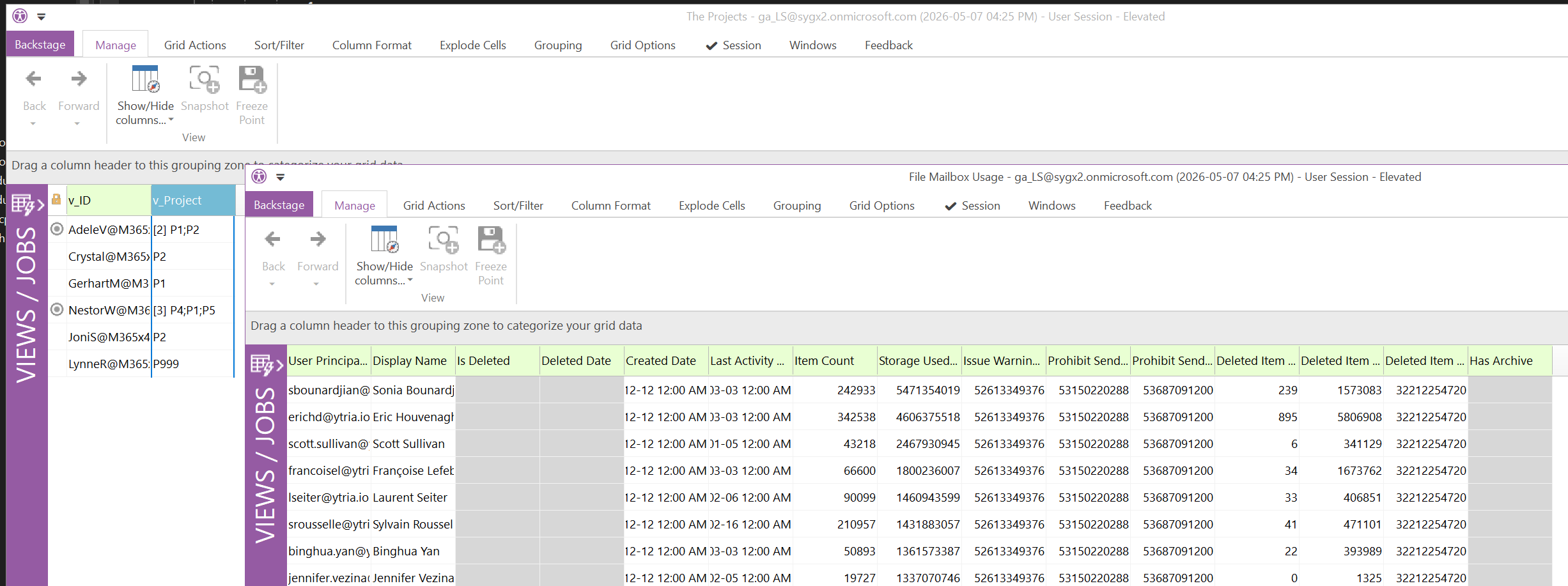
<CreateModule FrameId="MyListModule" Title="The Projects" List='UserCList' separator=","/>

<CreateModule FrameId="MyFileModule" Title="File Mailbox Usage" FilePath='C:\\_\\sapio365 - Mailbox usage.xlsx'/>
</ytriaAutomation>