As of 07/03/2026, all products are enabled with IF / ELSE management within the USERINPUT scope.
In this context, <IF> and <ELSE> tags are standard regarding:
-
evaluation
-
cascades (IF within IF within IF…)
<userinput …>
<If …>
<Variable…>
</If>
<else>
<Variable …>
<If …>
<Variable …>
</If>
<else>
<Variable …>
</else>
</else>
</userinput >
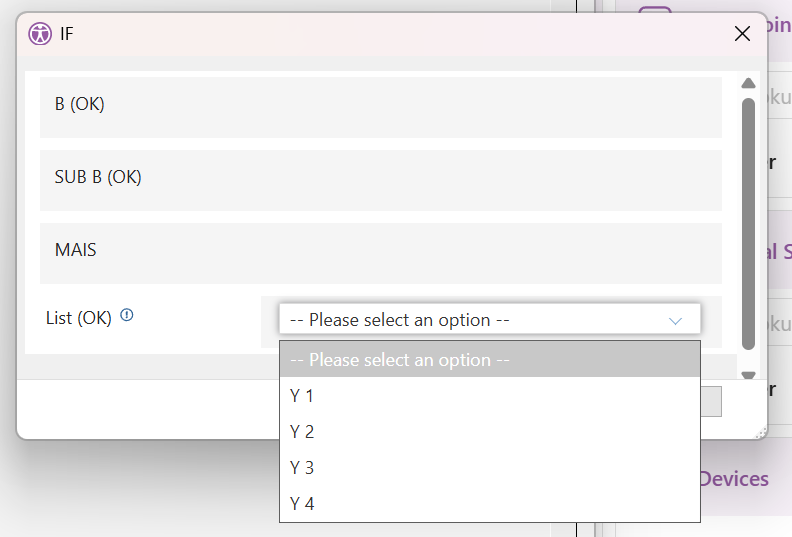
When a condition is met, the corresponding UI elements & variables are added to the UserInput dialog.
Other elements are ignored.
They cannot be used within the scope of a <Variable> tag, this is invalid:
<userinput …>
<Variable…/>
<If …>
<ListItem…/>
</If>
</Variable>
</userinput >
<?xml version="1.0" encoding="UTF-8" standalone="no"?>
<ytriaAutomation>

   <SetVar v_Msg='name'/>
   <SetVar v_Switch='2'/>
   <SetVar v_Sub='3'/>

    <List Name='ListX' W='X 1' Action='SetVar'/>
    <List Name='ListX' W='X 2' Action='SetVar'/>
    <List Name='ListX' W='X 3' Action='SetVar'/>
    <List Name='ListX' W='X 4' Action='SetVar'/>

    <List Name='ListY' W='Y 1' Action='SetVar'/>
    <List Name='ListY' W='Y 2' Action='SetVar'/>
    <List Name='ListY' W='Y 3' Action='SetVar'/>
    <List Name='ListY' W='Y 4' Action='SetVar'/>

    <userinput Title='IF' ButtonTextOK='OK'>
		<If target="var" test="{%v_Switch%}" mode="Equals" Value="1">
			<Variable Type='label' name='description' label='A (NOK)'/>
		</If>
		<else>
			<Variable Type='label' name='description' label='B (OK)'/>
			<If target="var" test="{%v_Sub%}" mode="Equals" Value="3">
				<Variable Type='label' name='ddd' label='SUB B (OK)'/>
			</If>
			<else>
				<Variable Type='label' name='description' label=' SUB B (NOK)'/>
			</else>
		</else>
        <Variable Type='label' name='label' label='MAIS'/>

		<If target="var" test="{%v_Switch%}" mode="Equals" Value="1">
			<Variable Name="RadioList" Type="List" Label="List (NOK)" Value="List item X" Tooltip="List tooltip">
				<ListItem Label='ChoiceLabel' Value='W' ListName='ListX'/>
			</Variable>
		</If>
		<ELSE>
			<Variable Name="RadioList" Type="List" Label="List (OK)" Value="List item Y" Tooltip="List tooltip">
				<ListItem Label='ChoiceLabel' Value='W' ListName='ListY'/>
			</Variable>
		</ELSE>
    </userinput>

</ytriaAutomation>