
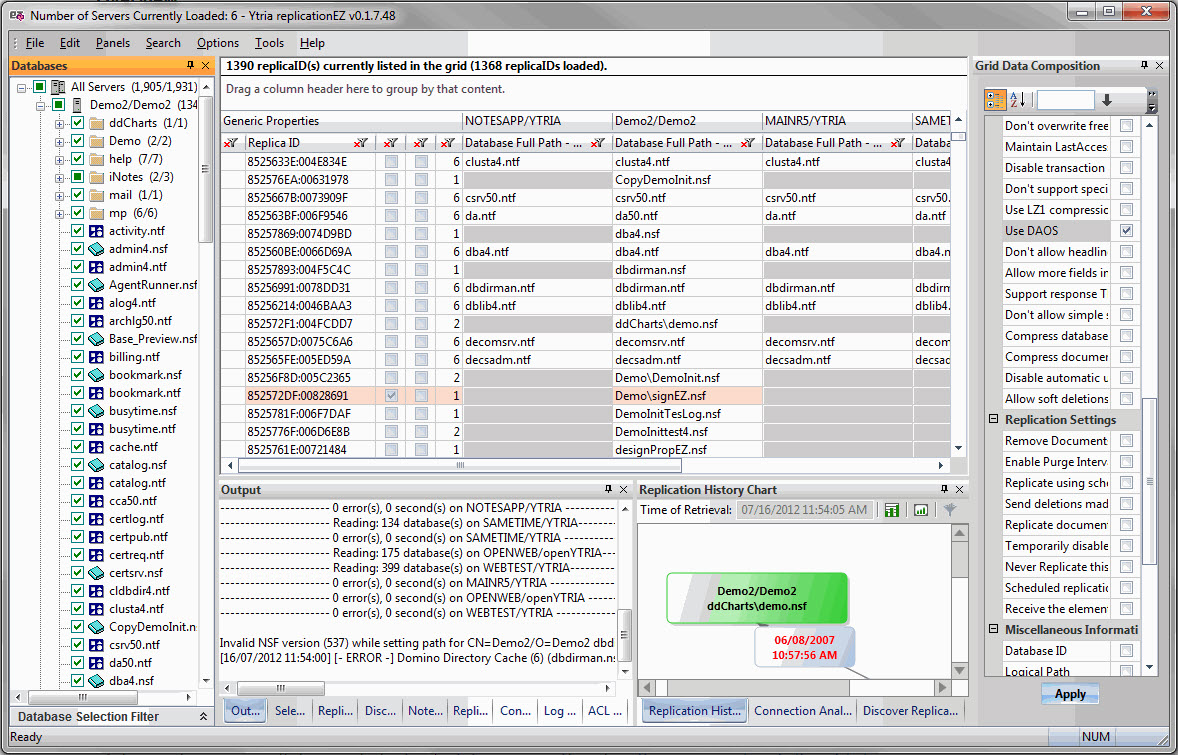
The main screen in replicationEZ features a fixed main grid for displaying database replicas across servers plus the following panels:
-
Databases panel (for loading databases in the servers that you have loaded in replicationEZ)
-
Output panel (displays errors and loading information)
-
Grid Data Composition (allows you to choose up to five database properties to display in the main grid)
-
Selected Databases grid (shows detailed replication settings information for up to 30 databases currently selected in the main grid)
-
Replication History grid (displays replication history information for up to 30 databases)
-
Replication History Chart (generates charts for visualizing replication events for a given database)
-
Discover Replicas Grid (replicationEZ can discover the replicas for a given database)
-
Discover Replicas Chart (generates a color-coded chart showing all replicas for a given database)
-
Note Counters grid (displays the counts for data and non-data notes in replicas to help determine discrepancies across servers)
-
Replication Settings grid (lists replication settings for a given selection of databases with each line representing a replica)
-
Connection Analyzer grid (displays replication linkages discovered through use of Connection Analyzer tool)
-
Connection Analyzer Chart (generates a chart based on a selected line in the Connections Analyzer Grid)
-
Log Analyzer grid (shows results of Log Analyzer scans)
-
ACL Comparator grid (shows results of Compare ACLs command).
Menu options
In addition to the panels mentioned above, the main screen also offers the following pull-down menu options:
File
-
Choose Servers (Ctrl+O)
-
Apply Changes (Ctrl+S)
-
Themes: Like all Ytria tools, replicationEZ offers a number of themes or skins to change the color scheme of the software.
-
Favorite Servers: Like in Ytria's other administration tools, you can set favorite servers in replicationEZ. Read more here.
-
Recent Servers: Recently accessed servers will be listed here for quick access.
Edit
-
Clear Replication History: This option allows you to clear the Replication History for any databases selected in the main grid. A confirmation dialog specifying the number of databases affected will appear when you use this command.
Panels
-
Databases panel
-
Output panel
-
Selected Databases
-
Replication History
-
Replication History Chart
-
Discover Replicas (grid)
-
Discover Replicas Chart
-
Connection Analyzer (grid)
-
Connection Analyzer Chart
-
Log Analyzer grid
-
ACL Comparator grid
-
Note Counters grid
-
Grid Data Composition
Search
-
Find All Ctrl+F3
-
Find First Ctrl+F
-
Find Next F3
Options
-
Read Database Immediately upon Selection: When this is selected, replicationEZ will display all of a database's properties as soon as its checkbox is ticked.
-
Read Database only when 'Apply' Button is Clicked: When this is selected, replicationEZ will only display a database's properties after you click the Apply button at the bottom of the Databases panel. This option can improve performance when you're accessing databases using a slow connection. NB: This option is automatically selected if you use a Database Selection Filter.
-
Database Files: Offers the following options for customizing the display of database filenames in the Databases panel:
-
Show Title: Displays the database's title (e.g: Bookmarks).
-
Show File Name: Displays the database's filename (e.g: bookmark.nsf).
-
Show Title - File Displays the database's title followed by its filename (e.g: Bookmarks -- bookmark.nsf).
-
Show File - Tile Displays the database's filename followed by its title (e.g: bookmark.nsf -- Bookmarks).
-
-
Full Access Administration: Like all Ytria tools, replicationEZ supports Full Access Administration.
Tools
-
Compare ACLs: This option will launch a process to compare the ACLs across replicas for any selected databases; results will be shown in the ACL Comparator grid.
-
Copy ACLs: This option allows you to copy the ACL of a selected database from one server's replica to another server's replica.
-
Compare Agents: This option will launch a process to compare the agents across replicas for any selected databases; results will be shown in the Agent Comparator grid.
-
Load Replication Settings
-
Load Replication History (Reset Replication History gird): Adds currently selected databases in main grid to the Replication History panel and while clearing any lines currently shown in the panel.
-
Load Replication History (Append and/or Refresh Replication History grid): Adds currently selected databases in main grid to the Replication History panel in addition to any databases currently shown in the panel.
-
Load Replication History Chart
-
Discover Replicas
-
Load Notes Counters
-
Connection Analyzer
-
Log Analyzer
Help
-
See the Help menu page for more information.