Devices

The Devices view is your starting point for viewing registered devices in your Microsoft 365 tenant and their properties.

Use this view to retrieve additional device information, including device owners and registered users, and to manage device-related data.

You can open a Devices view from:

Apply a custom filter to reduce the number of returned devices and improve load times.
get-devices.jpg

Sections

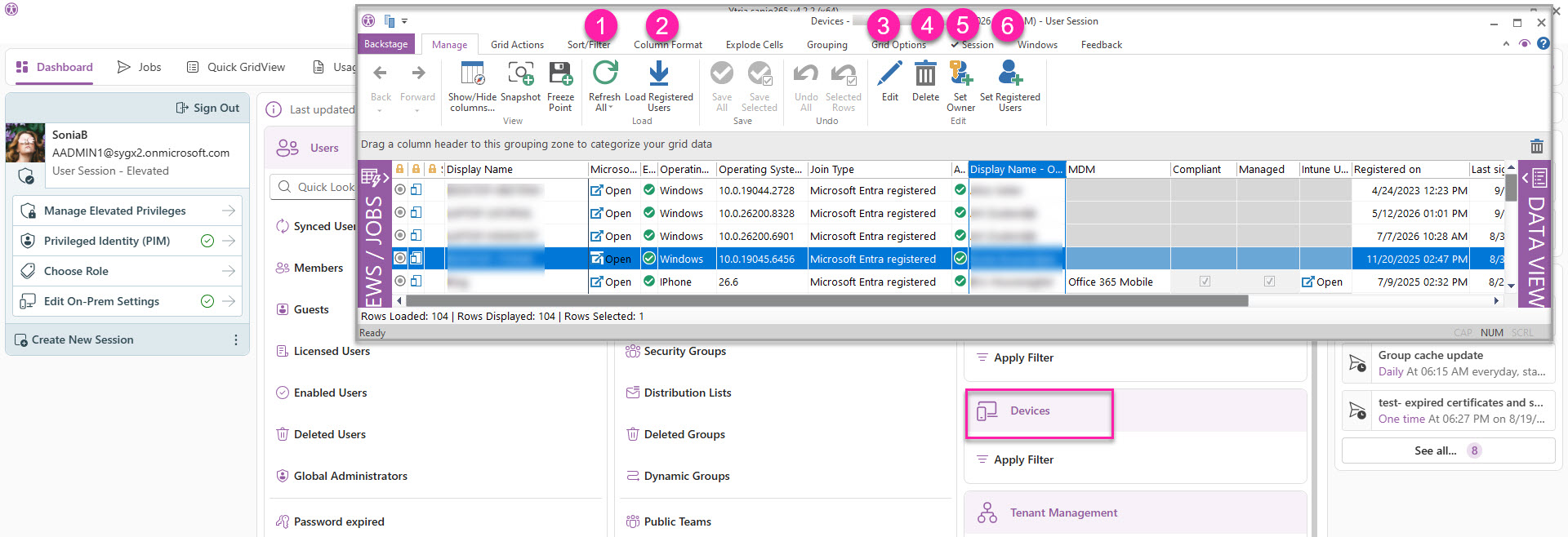
Use the following buttons to retrieve device information and manage registered devices.

Button

Description

1

Refresh

Refreshes the grid data or reinitializes the view.

2

Load Registered Users (Ctrl+L)

Loads the registered users for the selected devices. By default, sapio365 loads registered owners only.

3

Edit (F2)

Updates the following properties for the selected devices:

  • Display name

  • Account Enabled status

  • Custom attributes 1 to 15

4

Delete

Deletes the selected registered devices.

5

Set Owner

Sets the registered owner for selected devices by choosing users from the directory.

6

Set Registered Users

Adds or removes registered users for selected devices. Select users from the directory to add them, or remove users from the existing list.

You must load a device’s registered users before you can update its registered-user list.

Show/Hide Columns

In this module, you can analyze information of all the registered devices in your Microsoft Entra ID, including device owners and registered users.

You can add or hide columns 2 ways:

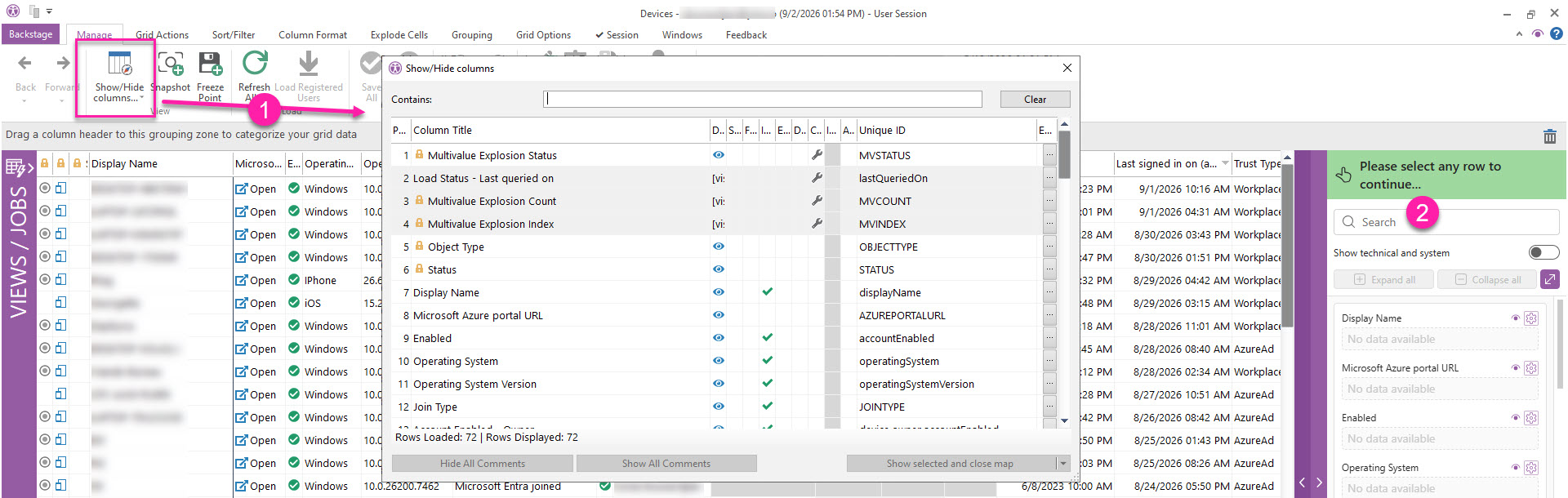
  1. The Show/Hide columns button lets you add or hide several property columns at once.

  2. Click the purple band on the far right to open the Data Viewer where you can search for a property, and add/hide it by clicking the eye icon closed-eye-icon.jpg .

See the full list of properties

Column

Note

Display Name


Microsoft Azure portal URL


Enabled


Operating System


Operating System Version


Join Type


Account Enabled - Owner


Display Name - Owner


MDM


Compliant


Managed


Intune URL


Registered on


Last signed in on (approximately)


Trust Type


Created on


Management Type


Manufacturer


Model


Custom Attribute 1


Custom Attribute 2


Custom Attribute 3


Custom Attribute 4


Custom Attribute 5


Custom Attribute 6


Custom Attribute 7


Custom Attribute 8


Custom Attribute 9


Custom Attribute 10


Custom Attribute 11


Custom Attribute 12


Custom Attribute 13


Custom Attribute 14


Custom Attribute 15


Device Category


Device ID (alternate key)


Device Metadata


Device Ownership


Username - Owner


User Type - Owner


GUID - Owner


Display Name - Registered Users

Click the 'Additional Info' button (Ctrl-L) to load this property value for selected rows.

Username - Registered Users

Click the 'Additional Info' button (Ctrl-L) to load this property value for selected rows.

User Type - Registered Users

Click the 'Additional Info' button (Ctrl-L) to load this property value for selected rows.

Account Enabled - Registered Users

Click the 'Additional Info' button (Ctrl-L) to load this property value for selected rows.

GUID - Registered Users

Click the 'Additional Info' button (Ctrl-L) to load this property value for selected rows.

Device Version


Domain Name


Enrollment Profile Name


Enrollment Type


External Source Name


Compliance Expiration Date Time


MDM App ID


Rooted


On Premises Sync Enabled


On Premises Last Sync Date Time


On Premises Security Identifier


Profile Type


Source Type


System Labels


Physical Ids


Identity Provider - Alternative Security IDs

Key - Alternative Security IDs


Type - Alternative Security IDs


GUID


device-properties.jpg