Skip table of contents

Manage Service Principals

After retrieving a list of service principals, you can perform the following actions on the ones you select:

ribbon-service-principals.jpg

Sections

Section

1

View

Show or hide property columns or save a Snapshot/Freeze Point.

2

Load

Refresh cached data or load assigned Custom Security Attributes for selected service principals.

3

Save/Undo

Save or remove applied changes (previews).

4

Edit

Update selected service principals.

5

Service Principal Management

Retrieve and manage the registered applications associated to the service principals (if applicable).

Show/Hide Columns

In this module, you can analyze information of all the service principals in your Microsoft Entra ID, including assigned roles and settings like account enabled, tags, and an association to a registered application.

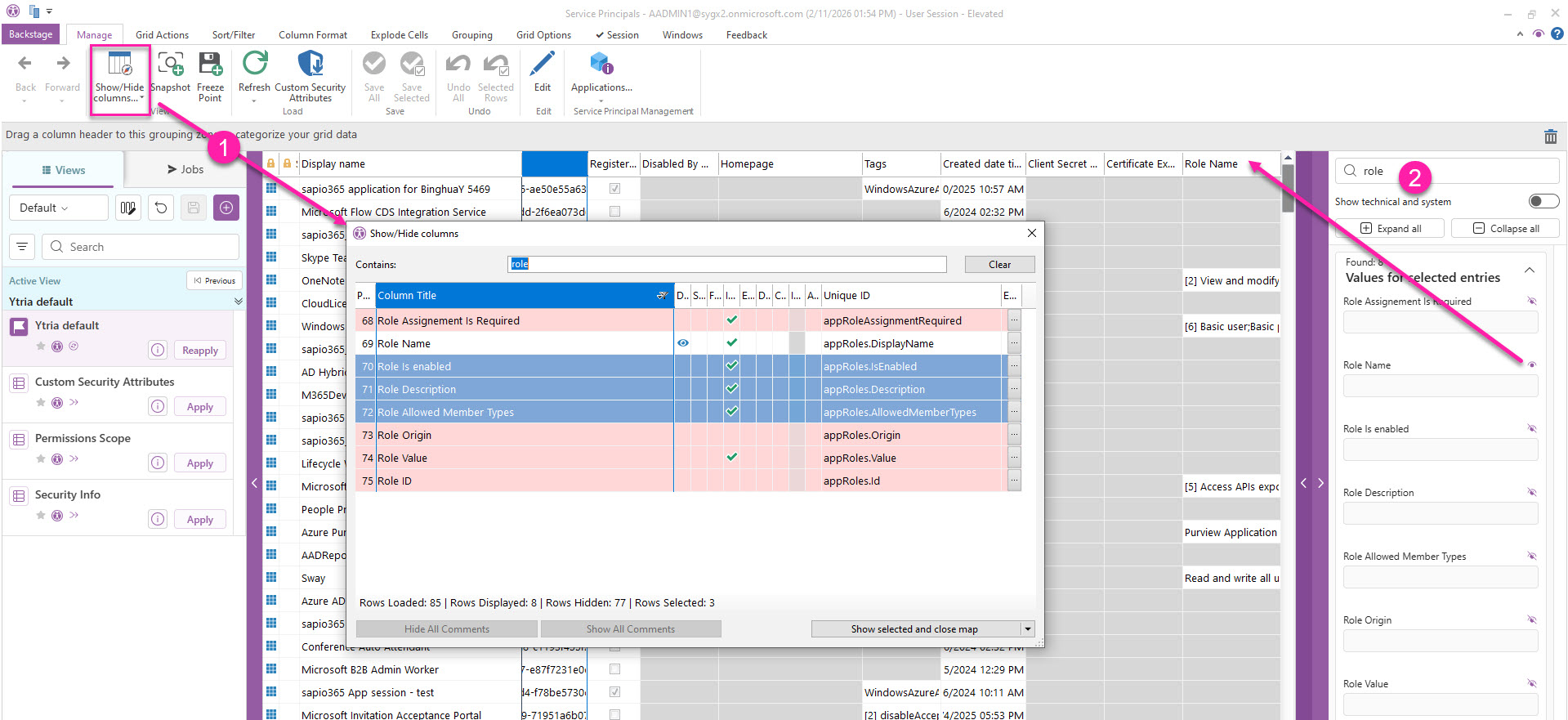
You can add or hide columns 2 ways:

  1. The Show/Hide columns button lets you add or hide several property columns at once.

  2. Click the purple band on the far right to open the Data Viewer where you can search for a property, and add/hide it by clicking the eye icon closed-eye-icon.jpg.

See the full list of properties

Column

Note

GUID

Display name

Account Enabled

Microsoft Azure portal URL

Application ID

Registered Application in current tenant

Disabled By Microsoft Status

Homepage

Tags

Created date time

Client Secret Expiration Date

Certificate Expiration Date

Description

Notes

Alternative names

Service Principal names

Service Principal type

Sign in audience

Token Encryption Key ID

Login URL

Logout URL

Reply URLs

Notification Email Addresses

Preferred Single Sign-On Mode

Preferred Token Signing Key Thumbprint

SAML Single Sign-On Settings Relay State

Application Display name

Application Description

Application Template ID

Application Owner Organization ID

Logo url

Marketing URL

Privacy Statement URL

Support URL

Terms of Service URL

Client Secret Name

Client Secret Start Date

Client Secret Hint

Client Secret ID

Certificate Name

Certificate Start Date

Certificate ID

Certificate Type

Certificate Usage

Certificate Key

Certificate Key Identifier

Permission Id

Permission Enabled

Permission Type

Permission Value

Permission Admin Consent Description

Permission Admin Consent Display Name

Permission User Consent Description

Permission User Consent Display Name

Scope ID - Web API

Scope Is enabled - Web API

Scope Origin - Web API

Scope Admin Consent Name - Web API

Scope Admin Consent Description - Web API

Scope User Consent Name - Web API

Scope User Consent Description - Web API

Scope Consent Value - Web API

Scope Consent Type - Web API

Role Assignement Is Required

Role Name

Role Is enabled

Role Description

Role Allowed Member Types

Role Origin

Role Value

Role ID

Add-In Id

Add-Ins Type

Add-In Property Keys

Add-Ins Property Values

Set - Custom Security Attributes

Click the 'Custom Security Attributes' button to load this property value for selected rows.

Name - Custom Security Attributes

Click the 'Custom Security Attributes' button to load this property value for selected rows.

Status - Custom Security Attributes

Click the 'Custom Security Attributes' button to load this property value for selected rows.

Type - Custom Security Attributes

Click the 'Custom Security Attributes' button to load this property value for selected rows.

Values - Custom Security Attributes

Click the 'Custom Security Attributes' button to load this property value for selected rows.

show-column-service-principals.jpg

JavaScript errors detected

Please note, these errors can depend on your browser setup.

If this problem persists, please contact our support.