
Run gridviews and jobs that use the Security & Compliance PowerShell module without the need to log in.
Whenever you use sapio365 to access Purview’s Compliance Search, such as creating a new compliance search, a special PowerShell module is needed. You will be asked for authorization credentials the first time you attempt this during a user session.
If you are running any jobs or scheduled gridviews that need this information, the task will fail unless you are at the keyboard to provide this authorization. There is an easy workaround.
You just need to allow sapio365 to provide this authorization using a certificate. You can provide one of your own, or sapio365 can create one for you.
This applies to registered applications used in:
-
Role sessions using RBAC credentials
Required steps
-
Switch from secret-based authentication to certificate-based authentication.
-
Enable the application to use Exchange Online PowerShell.

-
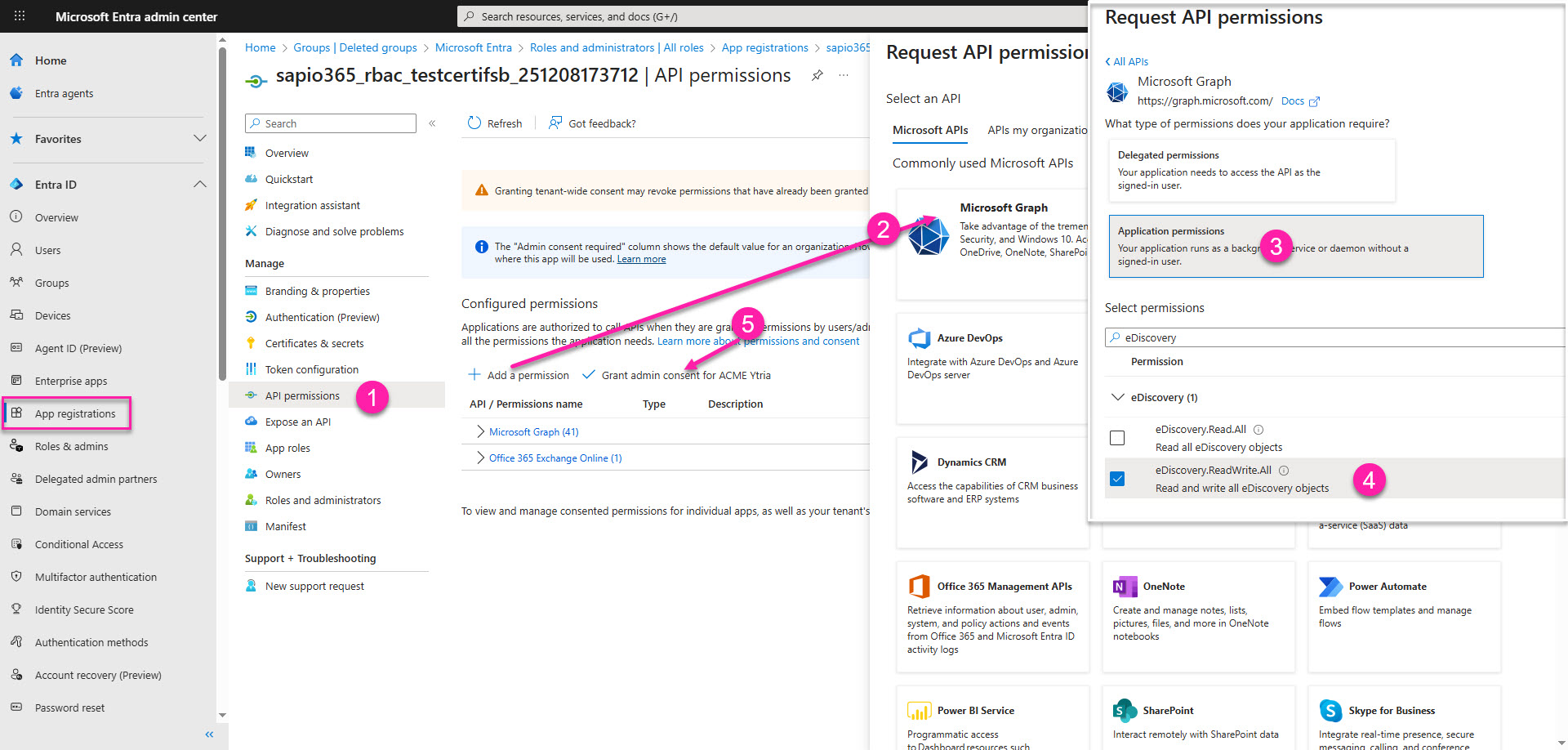
In Entra, add the Graph API permission eDiscovery.ReadWrite.All to your application. Give consent.
How to add Graph API permission ‘eDiscovery.ReadWrite.All’ in Entra admin center
In the Entra admin center, select the sapio365 application from the registered apps list:
-
Go to API permissions blade.
-
Click Add a permission → select Microsoft Graph.
-
Select Application permissions.
-
Check eDiscovery.ReadWrite.All.
-
Click Grant admin consent.
-
Add the service principal of the app to the necessary Purview roles by running the job, or you can run the PowerShell script below.