
The ability to open documents in scanEZ via a special scanEZ:// URL was introduced in the version 10.5 update. When this option is enabled, you can open Notes documents and designs in scanEZ directly from Web browsers or other external applications.
Enabling URL Launching
The Tools menu in scanEZ includes an "Allow scanEZ to be launched using 'scanEZ://'-type URLs" option.
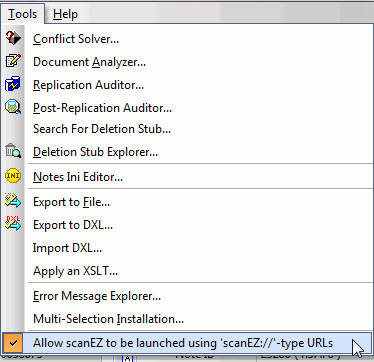
|
NOTE |
Windows 7 and Windows Vista users must run scanEZ as an administrator to initially enable the 'Allow scanEZ to be launched using 'scanEZ://'-type URLs' option.
|
|---|
Accepted URL Formats
The scanEZ:// URL is quite flexible in terms of acceptable formatting. As a rule of thumb, if the formatting works for a "notes://"-type URL, it should also work for opening a document (or design element) in scanEZ.
Format for opening documents:
scanEZ://server/database/view or folder/document
scanEZ://www.acmecorp.net/MyDatabase.nsf/MyView/My+Document+Key?OpenDocument

|
URL |
/Server |
/Database |
/View or Folder |
/Document |
|---|---|---|---|---|---|
|
Valid entries |
scanEZ:// |
Server name
|
Database path
|
0 (zero)
|
View Key
|
|
Examples |
scanEZ:// |
MyServer
|
MyDatabase.nsf
|
0
|
My+Document
|
|
Notes |
|
Note: The server name used must be recognizable by the 'Open Application' dialog in your Lotus Notes client (or the Open Database dialog in scanEZ). |
Note 1: Replica IDs must not include colon (:) symbols.
|
Note 1: Use "0" (zero) to open up a document without specifying a view. |
Note 1: If "0" is used rather than a view or folder name, a document UNID or NoteID is required (i.e. the View Key will not work).
|
Format for opening design elements:
scanEZ://server/database/design
scanEZ://www.acmecorp.net/MyDatabase.nsf/MyForm
|
|
URL |
/Server |
/Database |
/Design Element |
|---|---|---|---|---|
|
Valid entries |
scanEZ:// |
Server name
|
Database path
|
Name
|
|
Examples |
scanEZ:// |
MyServer
|
MyDatabase.nsf
|
MyView
|
|
Notes |
|
Note: The server name used must be recognizable by the 'Open Application' dialog in your Lotus Notes client (or the Open Database dialog in scanEZ).. |
Note 1: Replica IDs must not include colon (:) symbols.
|
|