Skip table of contents

Explode Cells - Multivalue Management

Some grid columns display values prefixed by a number in parentheses. This indicates that the attribute contains multiple values for that entry.

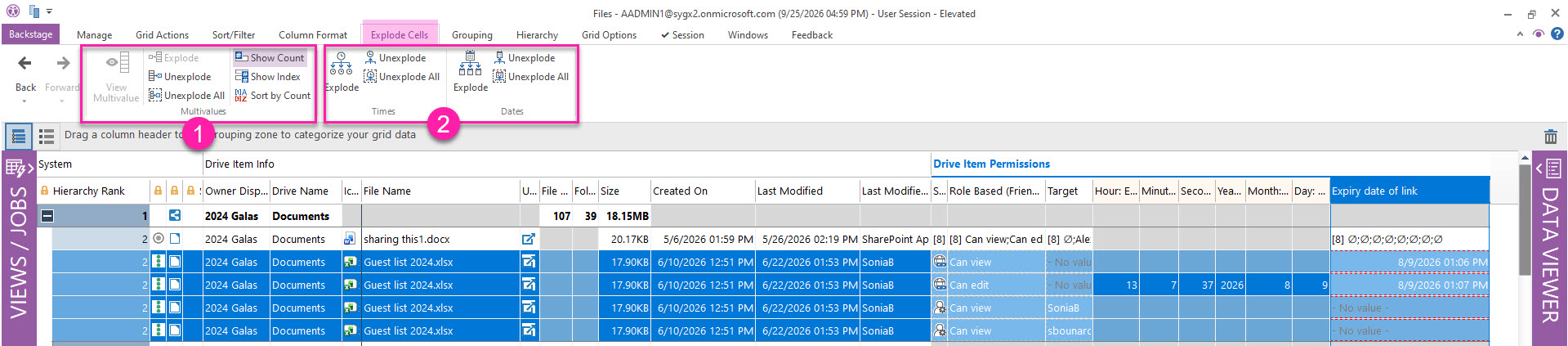
You can work with these multivalues from the Explode Cells ribbon tab or from the right-click menu.

explode-cells-tab.jpg

1. Explode or unexplode multivalues

Explode multivalues into separate rows, or return them to their original state with these options.

Multivalue column families

When you explode a cell that is part of a related property family, sapio365 explodes all associated cells as well. This occurs when the original property is parsed into multiple components.

Explode

Select a specific multivalue cell to explode. If no multivalue cell is selected, sapio365 prompts you to choose from the available columns that contain multivalues. You are also asked whether you want to explode only the selected rows or all rows.

Unexplode

This option lets you return cells to their unexploded state by selecting any exploded component.

Unexplode All

This option returns all exploded cells in the current view to their unexploded state, regardless of selection.

2. Show or hide counts, or sort by count

Show Count lets you toggle the number shown in parentheses in all multivalue cells for a cleaner view.

Sort by Count sorts the selected multivalue column by the number of items in each cell, from highest to lowest, and then sorts alphanumerically.

3. Explode dates and times

These options let you split selected date/time property values into separate hours, minutes, and seconds columns, or display them as separate year, month, and day columns.

4. View Multivalue

Instead of exploding a selected multivalue cell in the current grid, you can open it in a mini grid. This lets you focus on that specific multivalue without changing the current view.

Learn more about the View Multivalue feature.

JavaScript errors detected

Please note, these errors can depend on your browser setup.

If this problem persists, please contact our support.