
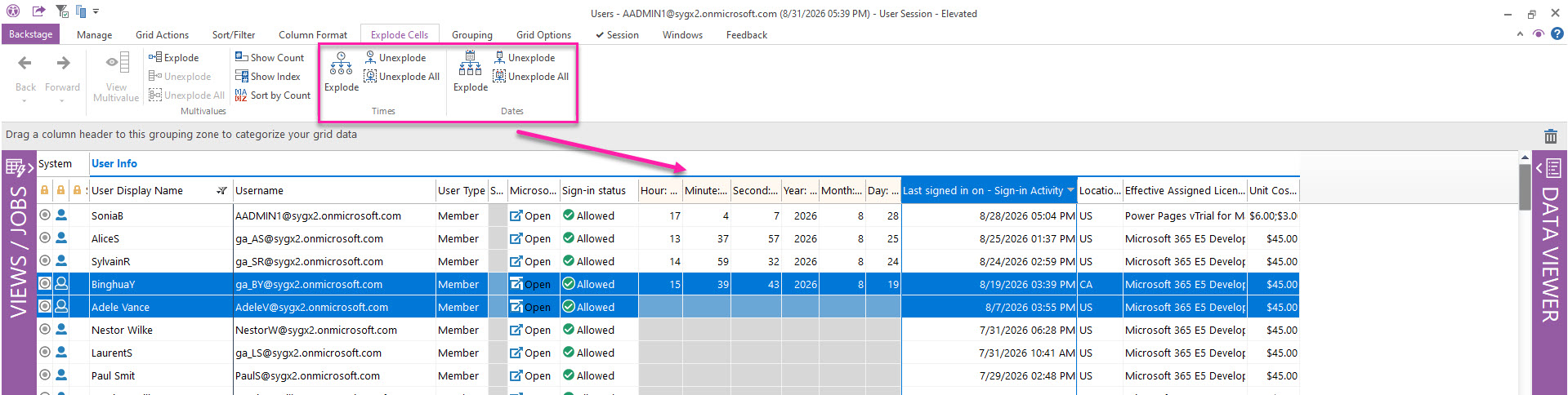
Date/time columns can be formatted to display cell values' date and time components in different ways. The Date and Time sections of the Explode Cells ribbon tab lets you parse the value in a selected date/time cell into separate integer components.
Use these options to create separate columns for easier viewing, sorting, and filtering:
-
Time: Hours, minutes, and seconds
-
Date: Year, month, and day
Explode
Select one or more date/time cells, then click Explode to display each component in a separate column.
Unexplode
Select rows that contain exploded date or time columns, then click Unexplode to remove the exploded columns for those rows.
Unexplode All
Click Unexplode All to remove all exploded date or time columns from the current view, regardless of your selection.