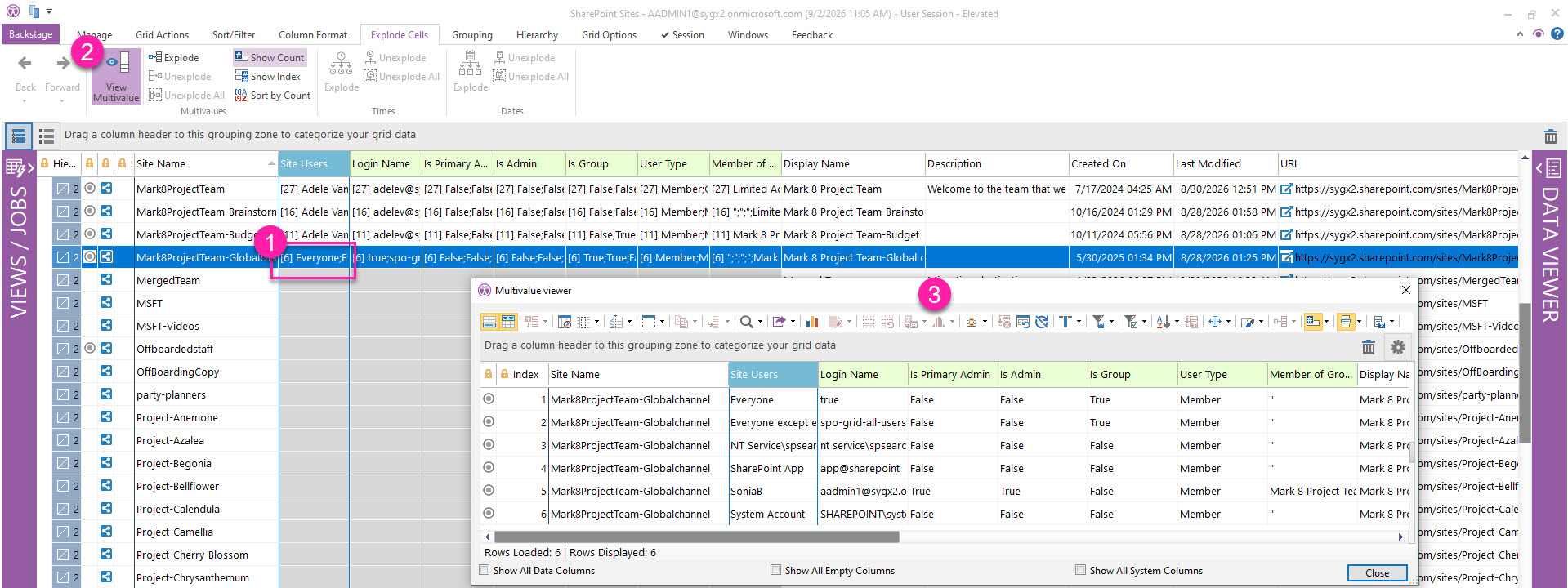
When analyzing a property that contains multiple values, you can open a selected multivalue cell in a separate mini grid instead of exploding it in the current grid.
This lets you focus on the values in that cell without changing your current grid view.
View Multivalue is available only when you select a single multivalue cell.
List Parsed Multivalues in a Mini Grid
To view the individual values in a multivalue cell without changing the current grid:
-
Select a cell that contains multiple values.
-
On the Explode Cells ribbon tab, click View Multivalue. Alternatively, right-click the cell and select Grid Tools & Options > View Multivalue.
-
Review the values in the mini grid that opens.
The mini grid provides the same grid options available in the main view, including sorting, filtering, and grouping.
Multivalue cells in a column family
When you view a multivalue cell that belongs to a related property family, the mini grid also includes values from all associated columns. This can occur when sapio365 parses an original property into multiple components or when an automated job, such as Manage users’ access to sites, creates the related columns (shown in the image below).